
A better storefront. With evidence behind it.
Turn a question about your store into a controlled test. Compare real orders, understand the uncertainty, and see when a change is worth keeping.
One A/B test on Free. Unlimited tests on Starter and Advanced.
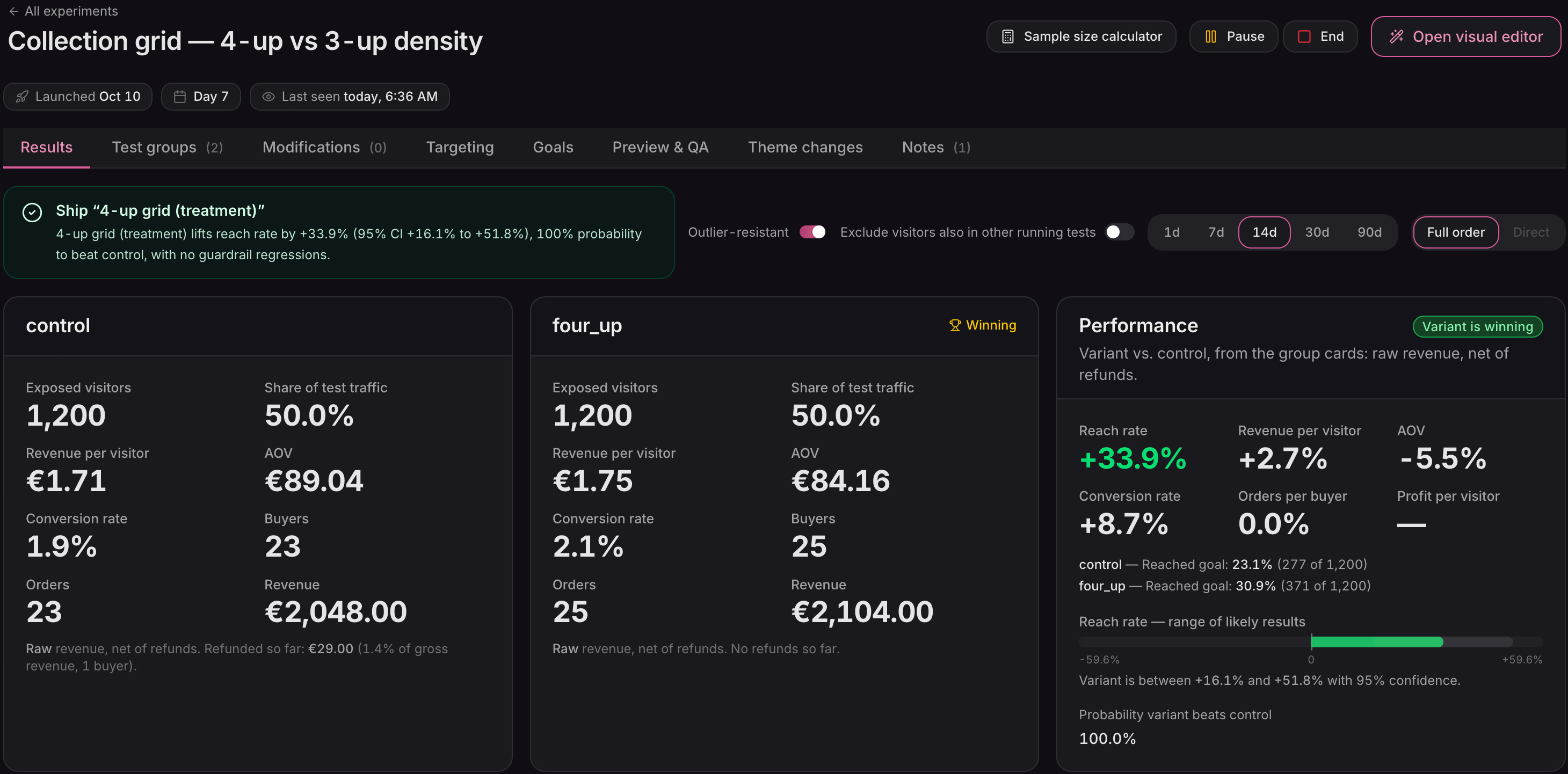
The primary goal, the supporting metrics, and the uncertainty behind the result — together in one view.
Full viewSwipe or scroll to explore. Use arrow keys when focused.
01 / Design the test
One question.
A clear comparison.
A new headline, a simpler collection page, a different route from your ads. Give the idea a control, decide who should see it, and preview both experiences before you start.
- 01
Build the alternatives
Use the visual editor for storefront changes, deliver variants through your theme, or split traffic between different page URLs.
- 02
Choose the audience
Target by page, device, new or returning visitors, traffic source, or shopping currency. Set the share of traffic each group receives.
- 03
Preview, then start
Check every group in Preview & QA. Once the test is running, shoppers keep their assigned group for the window you choose.
Running several tests? Exclusion groups can keep new participants in one test or the other. The results also show overlap so you can investigate tests that interact.
02 / Choose the goal
Measure the change
you meant to make.
A product-page test might aim to lift revenue per visitor. A navigation test might ask whether more people reach a product at all. Choose the primary metric before you start, and keep the other outcomes in view.

Visitors, orders, and revenue are still recorded whichever primary metric you choose.
Full viewSwipe or scroll to explore. Use arrow keys when focused.
Give reach rate a destination
Choose the page shoppers should reach and how soon they should get there. It gives a menu or collection-page test a goal closer to the change itself.
Watch for trade-offs
Add guardrail metrics alongside the main goal. More clicks mean less if revenue falls or refunds rise. Each guardrail shows its own result and level of certainty.
03 / Read the evidence
A useful result
isn’t always a winner.
Sometimes the new version earns its place. Sometimes the useful discovery is that your current page is better. Ordinary brings the result back to a decision, with the evidence underneath.
The verdict can recommend keeping a test running, shipping a winner, or stopping a losing group. A green number on its own is never the whole story.
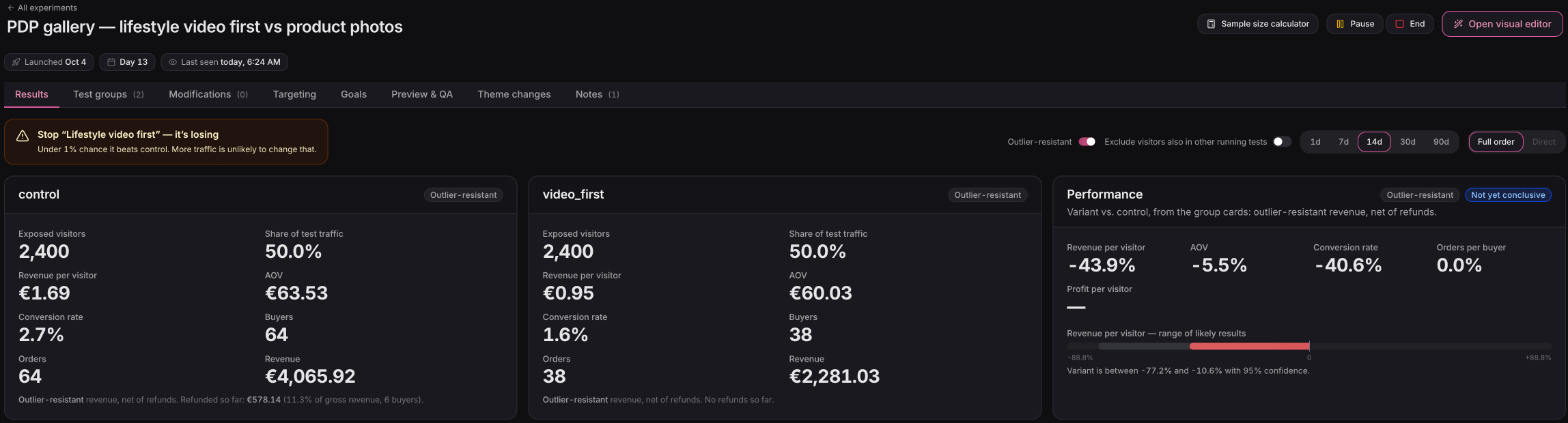
A losing-variant recommendation sits beside the group results. Stopping a likely loser uses a different threshold from declaring a winner.
Full viewSwipe or scroll to explore. Use arrow keys when focused.
See the range
Read the lift alongside its range of likely results. Peek-safe statistics let you check progress without treating every daily fluctuation as a verdict.
Keep revenue honest
Results include refunds recorded against the orders so far. Switch between outlier-resistant and raw revenue to understand unusually large purchases.
Understand the difference
Compare the funnel by group to see where the change helped or hurt. Use device and traffic breakdowns to find questions worth testing next.
04 / The details
A fair test starts
with clear rules.
Understand who counts, what changes on your store, and when a result is ready to trust.
Read the testing guideWhat is included on Free?
Your first A/B test is included. Ending, archiving, or deleting it does not create another free slot. Starter and Advanced remove the test limit, and your existing results remain readable.
Who counts as a test visitor?
For tests that change part of a page, a shopper counts once the test’s content is confirmed on the page they are viewing. Split-URL tests count at the trigger page. Preview visits do not count, and consent requirements can reduce the traffic available to measure.
Does Ordinary change my theme?
Some visual-editor changes are applied as the page loads; content changes may be placed in your theme. The Theme changes tab shows what was changed and provides the removal controls. Ending a test does not automatically remove saved theme edits. Theme-code tests use the markup you provide.
Why can results move after a test ends?
Orders from shoppers who already saw a variant can still arrive within its attribution window — 14 days by default. Later refunds also affect revenue. The results preserve the view at the moment you ended the test alongside the current result.
Can I change the traffic split while it runs?
Yes. New visitors follow the updated split; existing participants keep their group. You can set a group to 0% to stop sending it new traffic. Changing the actual variant content is different: start a fresh test for a fresh comparison.
Give your next idea a fair test.
Connect your Shopify store, choose a question, and measure what changes. Your first A/B test is included on Free.
Connect your store