
Overview
Most brands pick the product they advertise to new customers by looking at first-order numbers: what converts, what sells, what has the best return on the day. But the first order is only the start. Which product wins a customer's first purchase tends to go hand in hand with whether that customer ever buys again.
So we added a first-product breakdown to Cohorts. Say your hero product and a smaller starter kit both bring in plenty of new customers: group them side by side and you can see which one brings in customers who keep spending, then lead your acquisition with that one.
What you see
Your customers, by where they started
Group customers by their first product
Alongside channel, country and U.S. state, you can group every customer by the first product they bought from you. Each product becomes its own cohort, side by side.
Compare what each group spends over time
Follow how much each first-product group goes on to spend as the months pass. A product that wins a smaller first order can still bring in customers who are worth far more a year later.
See who comes back for a second order
Each group shows how many customers returned to buy again, so you can tell a one-and-done product apart from one that starts a habit.
Young cohorts show a dash
When a cohort is too young to be measured for a window, it shows a dash rather than a number. You never compare a group's early weeks against another group's full year by mistake.
Share the exact cut
The breakdown you pick is saved in the page link. Send it to a teammate or your agency and they open the same view you're looking at.
Worth over time
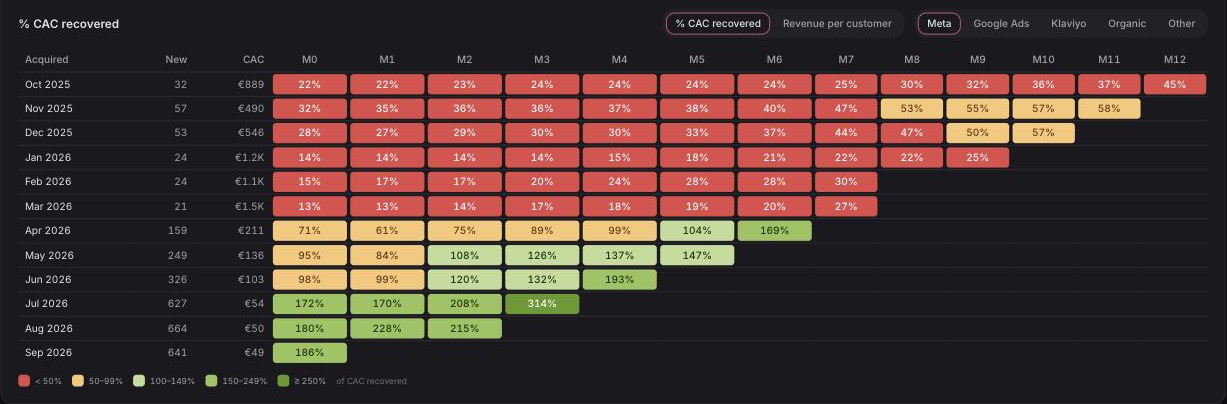
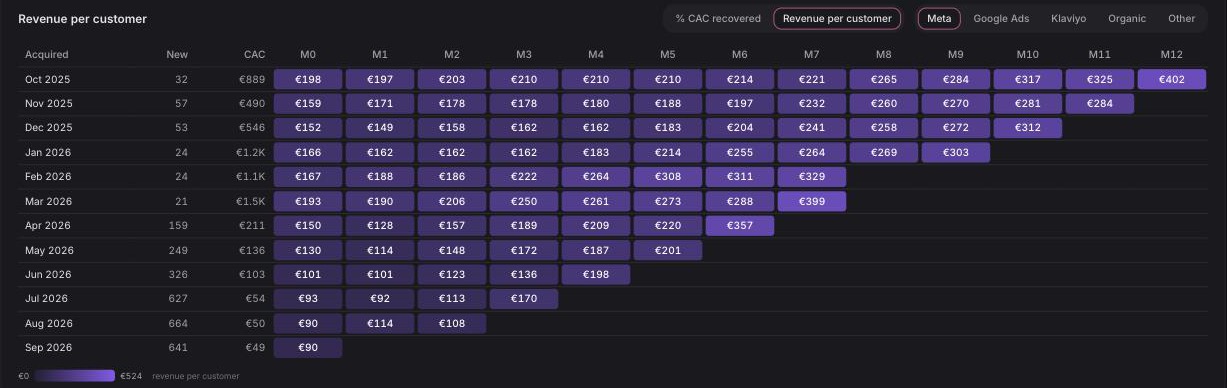
Watch every month's customers pay back
Each row is a month of new customers, and each cell is how they're doing one, two, up to twelve months later. Switch between two views: how much of what you paid to acquire them they've already earned back, and how much each customer has spent so far.
Flip between Meta, Google Ads, Klaviyo, organic and everything else to see which channel's customers pay for themselves, and how fast.
Also in this release
Two smaller things
Search everything with F
Press F anywhere in Ordinary to search orders, customers, products, experiments, saved reports and pages from one box. Available on every plan.
Ad spend in your store's currency
Meta and Google ad spend billed in another currency shows in your store's currency, converted at each day's rate. A small badge marks any view that includes converted figures.
Available now
Cohorts, including the first-product breakdown, is available on the Advanced plan. Search with F works on every plan.
 Connect your store