
Overview
Until a test is conclusive, "keep running" is the right call for a version that might be winning. For one that's clearly behind, every extra week is a week of sending shoppers to the page that sells less. And on a store without huge traffic, waiting for certainty can mean waiting months.
Ordinary's test results now tell you when to stop a losing version, and how likely it is to come back. And when you run several tests at once, they name the best version of each, weighed together. For how tests are scored in the first place, see A/B test results that speak revenue.
Stop — it's losing
Stop sending shoppers to the weaker page
A clear call when a version is losing
When a running test's new version is behind and very unlikely to catch up, the verdict at the top of the test now reads Stop — it's losing, and names the version. You don't have to wait for the test to reach significance to hear it.
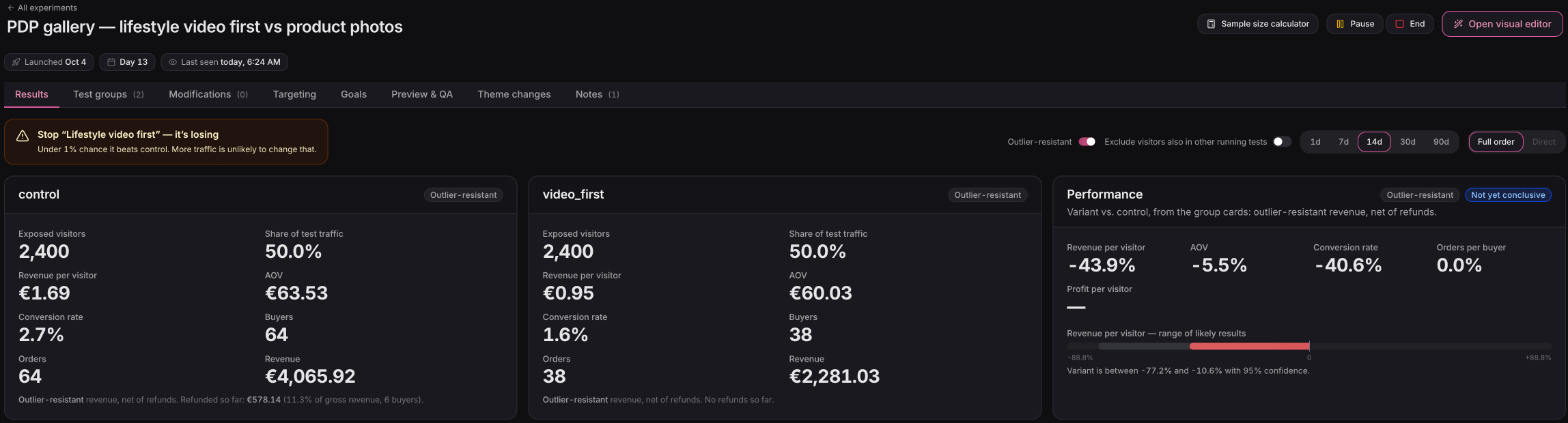
The odds, in one line
Under the verdict sits the chance the version still beats your original, and a plain note that more traffic is unlikely to change that. It's one number you can take to the rest of the team.
Why stopping is a lower bar than shipping
Calling a winner should take strong evidence, because you'll live with the change. Stopping a loser is different: the most you give up is a small win that probably wasn't there, while every extra day sends real visitors, and real revenue, to the weaker page. So Ordinary speaks up sooner on a loser than it does on a winner.
Built for stores without huge traffic
On a store with a few thousand visitors a week, a revenue test can take months to reach significance, and many never get there. Waiting that long ties up the page and leaves every other idea in the queue. A clear stop call, or an early sign on overlapping tests, lets you end a loser in days, put the next version live, and run more tests a quarter on the same traffic.
The other verdicts stay as they were
A clear loss still says Keep control, a clear win still tells you to ship it, and a test that's simply too close still says to keep running. A test you've already ended never gets told to stop.
Overlapping tests
The best version of each test, weighed together
Best so far, when tests overlap
Running more than one test on the same pages? The overlap card on each test now opens with Best so far: one chip per test, naming the version that's ahead once all the overlapping tests are weighed together. Each chip says how sure it is: Clear, Early sign, Too close or Too early.
An early read, before it's certain
You don't have to wait for every test to be conclusive to see where things are heading. Early sign means a version isn't proven yet, but the results point clearly one way, and the other versions are unlikely to overtake it. When every test has a call, the winning combination is shaded green in the table, so you can see which pairing to keep while the tests finish.
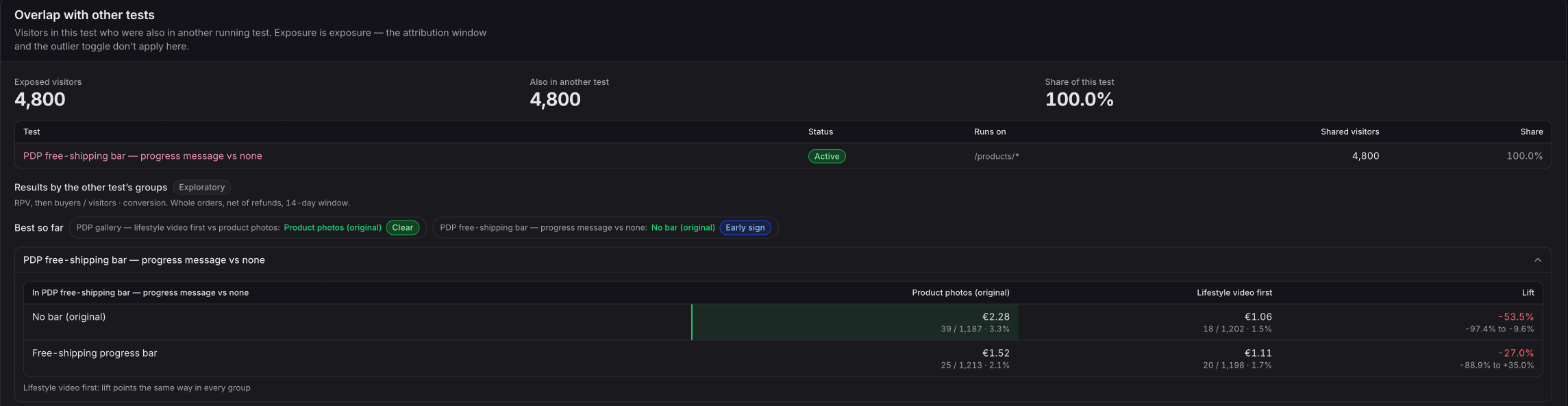
Each test's result inside the other's groups
The table shows this test's result for the visitors in each of the other test's versions. If a change only works next to one version of another test, you'll see it, and you can decide the two together. The original version of every test is marked, so the rows are easy to read.
Also in this release
Find any product, order or customer as you type
Search right on top of your tables
Products, Orders and Customers now have a search box on top of the table, the way Shopify's own lists do. Find a product by name, SKU or brand as you type; find an order by its number, the customer, a discount code or a campaign; find a customer by name, email, phone or tag. Every column on the Products list sorts with a click, across the whole list.
Available now
The stop verdict is live on every plan, and so are search and sorting on your tables. Best so far appears on every plan whenever two or more of your tests overlap; building more than one test in Ordinary is on the Starter plan and above.
 Connect your store