
Overview
Your own GA4 events, such as add to cart, begin checkout or a quiz completed, now sit on Marketing Mix, split by channel, next to the orders each channel brought in. A channel that fills carts but rarely converts stands out straight away; to connect GA4, see our Shopify GA4 integration.

Marketing Mix
Your GA4 events report, split by channel
Your events at a glance
Connect GA4 and Marketing Mix becomes a GA4 events report by channel: add to cart, begin checkout, sign-ups or a quiz completed, each with its change from the period before.

Pick any event, for any dates
Choose which of your GA4 custom events to compare. The section follows the dates you've picked for the page, so the events and the orders always cover the same period.
Also in this release
A/B tests: a read while they run
See which way a running test is leaning
While a Shopify A/B test is still running, its verdict says which version is leaning ahead, labelled as a directional read, and says so when a version is clearly losing.
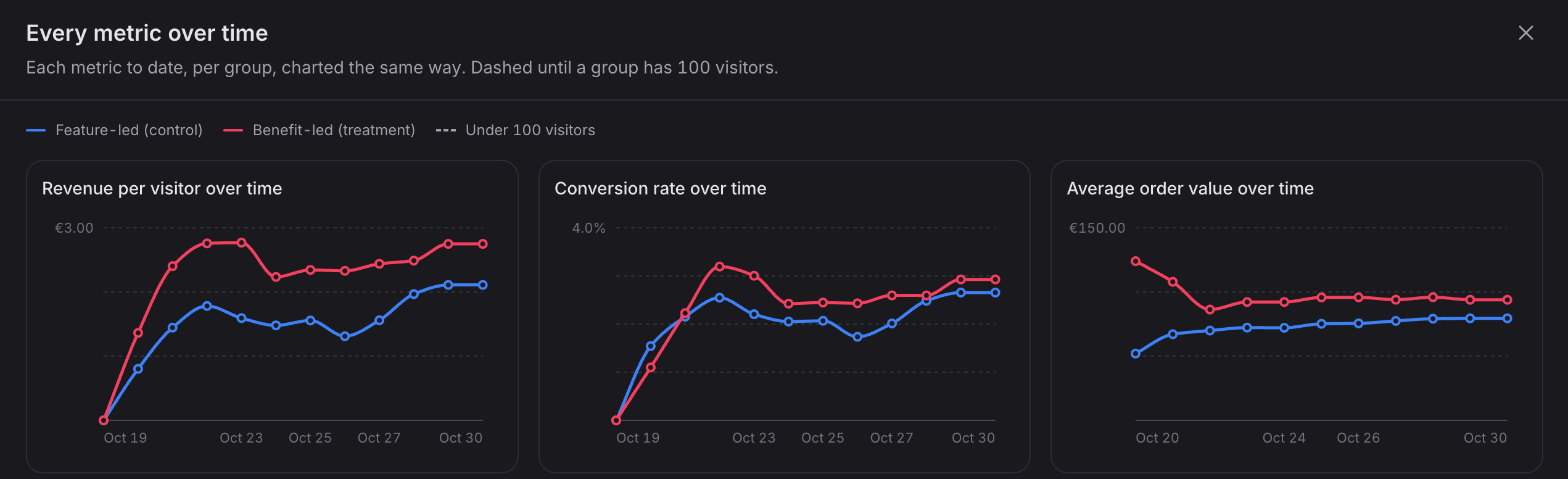
Any test metric over time
The over-time chart on a test's results now plots any metric the results page reads, side by side.
Available now
GA4 events on Marketing Mix are live for every store with GA4 connected; the GA4 integration is on the Starter plan and above. The A/B testing updates are on every plan.
 Connect your store